Proxy server
Forward proxy
- Primiarily serves clients
- used for anonymity, content filtering, bypassing restrictions
Reverse proxy
- Primiarily serves servers
- used for load balancing, caching, SSL termination, enhancing sercurity
The usage of nginx
The functionalities of Nginx as a proxy server
-
load balancing
static dynamic round robin least connection method weighted round-robin least response time method source ip hash http { upstream [] { server ... server ... server ... } server { ... } } -
caching (without request to server and database)
-
security
-
compression and segmentation
Nginx:
- Load balancing across multiple servers
- High performance web server (ideal for serving static content)
- Reverse proxy forwarding to appropriate back-end server
- sercurity features (SSL termination)
Nginx can be used as an ingress controller in kubernetes
Node.js:
- Load balancing across multiple CPU cores.
- Express.js is a server framework for Node.js
- Used to build dynamic web apps and APIs by defining routing logic
- Build custom middleware (managing Gzip compression)
brief details for node.js
Node is a cross-platform, open-source javascript runtime environment
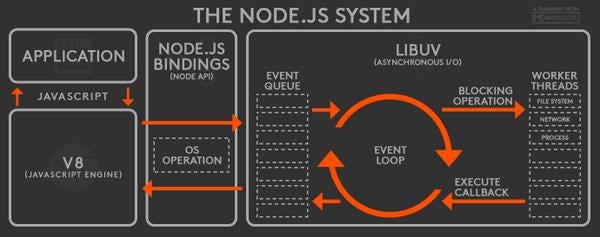
source [https://miro.medium.com/v2/resize:fit:1200/1*iTdvBPVxYZdJZQKsP3yILw.jpeg]
Nginx configuration file
mine types : the default file already included most of format used in the web. (css,html,jpg)
location context: alias can be used to direct absolute path.
load balancer: the default algorithm is round robin. Using docker to create 4 servers to test the load balancing status.
- Using express.js to build a simple backend server to show some message on browser, and dockerizing the file to build an image.

- Mapping the server to 4 different ports through docker

- Modify the nginx.conf with the above code format and write a access_log to check the status of load balancer.
http{
    include       mime.types;

    upstream backendserver{
        server 127.0.0.1:1111;
        server 127.0.0.1:2222;
        server 127.0.0.1:3333;
        server 127.0.0.1:4444;
    }

    log_format upstreamlog '$server_name to: $upstream_addr {$request} '
        'upstream_response_time $upstream_response_time'
        ' request_time $request_time';

    server {
        listen 8080;
        root /mysite;
        # server_name  localhost;

        access_log logs/nginx-access.log upstreamlog;
    }

}


