What is Kubernetes?
Kubernetes is an open-source platform that automates the deployment, management, and scaling of containerized applications. It’s a common tool to manage the microservices-based applications across various environments for mid and large size companies.
The core components of Kubernetes: a controle plane and one or more nodes. The following figures from official website introduced the architecture of kubernetes.
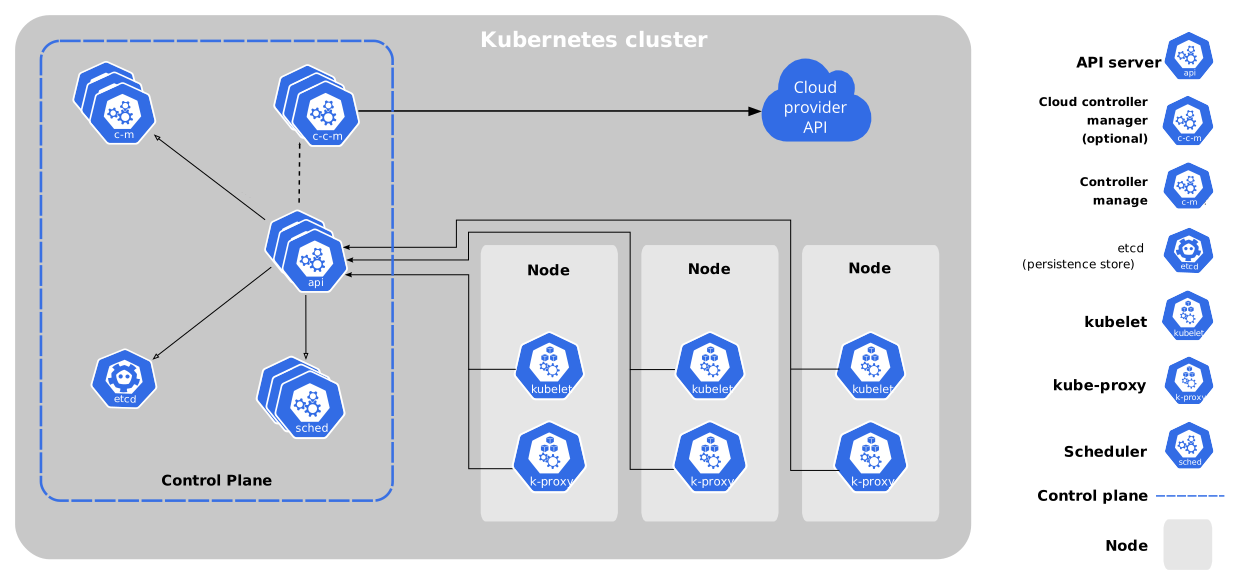 Figure 1. Components of Kubernetes
The second figure has more details to show in each node
 Figure 2. Cluster Architecture
Brief details of each components
Control Plane Components
- kube-apiserver: the core component server that exposes the Kubernetes HTTP API
the above command can be used to check more information for kubernetes api, which includes namespace, apiversion,kind,etc.
kubectl api-resources - etcd: consistent and highly-available key value store for all API server data
- kube-scheduler: looks for pods not yet bound to a node, and assigns each Pod to a suitable node. [Pod is the smallest deployable unit in kubernetes, and not usually created directly]
- kube-controller-manager: Runs controllers to implement Kubernetes API behavior
- cloud-controller-manager (optional): integrates with underlying cloud providers
Node Components
- kubelet: ensures that Pods are running, including their containers.
- kube-proxy (optional): Maintains network rules on nodes to implement Services.
check the statues of nodesystemctl status kube-proxy - Container runtime: Software responsible for running containers
Some usage of minikube
Minikube is a local tool that can apply the kubernetes development on the personal computer.
Using docker as driver to start minikube is more convenient.[Only windows Pro has hyper-V features in control panel]
minikube start --driver=docker # start minikube

alias k = 'kubectl' # abbreviation

k config view # configuration for kubectl

kubectl cluster-info # cluster running information

kubectl get nodes # node info, it will show minikube

kubectl describe node minikube # node info of minikube, it will include allocated resources, events, etc.
## namespace

kubectl get namespace

kubectl create/delete namespace <name>

(eg. kubectl create/delete namespace prod/dev/test)

kubectl describe namespace <name>
Namespace can be write as -n prod/dev or other customized namespace in get or deployment command.
kubectl get pods -n dev

kubectl get pos --all-namespace

kubectl create deyployment <name> --image=kicbase/echo-server:1.0  # default namespace, or add -n dev to development

kubectl delete deployment <name>

kubectl get events -n dev # check the events of application on the specific namespace
Deployment tests
kubectl apply -f <name.yaml>

kubectl get deployments.apps

kubectl get replicaset

kubectl get pods
The data changed in the ConfigMap need different name in metadata when updating the deployments.
Helm
Helm is a package manager of kubernetes, as npm in node.js. The helm chart contains chart metadata and template. The template is kubernetes resources include the config, service and deployment. The values.yaml is the interface of kubernetes cluster.


